
教程:运行全系统 Linux 启动测试
简介
本教程介绍如何使用 gem5art 运行 gem5 实验。我们将进行的特定实验是测试各种 Linux 内核版本和模拟器配置的启动。 使用 gem5art 执行此类实验的主要步骤包括:设置环境、构建 gem5、创建磁盘镜像、编译 Linux 内核、准备 gem5 运行脚本、创建作业启动脚本(也将注册所有必需的组件),最后运行此脚本。
We assume the following directory structure to follow in this tutorial:
boot-tests/
  |___ gem5/                                   # gem5 source code
  |
  |___ disk-image/
  |      |___ shared/                          # Auxiliary files needed for disk creation
  |      |___ boot-exit/
  |            |___ boot-exit-image/           # Will be created once the disk is generated
  |            |      |___ boot-exit           # The generated disk image
  |            |___ boot-exit.json             # The Packer script
  |            |___ exit.sh                    # Exits the simulated guest upon booting
  |            |___ post-installation.sh       # Moves exit.sh to guest's .bashrc
  |
  |___ configs
  |      |___ system                           # gem5 system config files
  |      |___ run_exit.py                      # gem5 run script
  |
  |___ linux-configs                           # Folder with Linux kernel configuration files
  |
  |___ linux                                   # Linux source will be downloaded in this folder
  |
  |___ launch_boot_tests.py                    # script to launch jobs and register artifacts
设置环境
首先,我们需要创建主目录 boot-tests,该目录将包含运行这些测试所需的所有创建的组件。 此目录还需要转换为 git 仓库。 通过使用 boot-tests git 仓库,我们将尝试跟踪那些本身不是组件或不是任何其他组件一部分的文件中的更改。 此类文件的示例是 gem5 运行和配置脚本(config-boot-tests)。 我们希望确保能够记录这些脚本中的任何更改,以便可以将 gem5 的特定运行与这些文件的特定快照关联起来。 所有此类文件(不是其他组件的一部分)将成为实验仓库组件的一部分(我们将在本教程后面展示如何注册该组件)。 我们还需要向此仓库添加一个 git remote,指向我们希望托管此仓库的远程位置。
Create the main directory named boot-tests and turn it into a git repo:
mkdir boot-tests
cd boot-tests
git init
git remote add origin https://your-remote-add/boot-tests.git
We also need to add a .gitignore file in our git repo, to ignore tracking files we don’t care about:
*.pyc
m5out
.vscode
results
venv
disk-image/packer
disk-image/packer_1.4.3_linux_amd64.zip
disk-image/boot-exit/boot-exit-image/boot-exit
disk-image/packer_cache
gem5
linux-stable/
gem5art relies on Python 3, so we suggest creating a virtual environment (inside boot-tests) before using gem5art.
virtualenv -p python3 venv
source venv/bin/activate
gem5art can be installed (if not already) using pip:
pip install gem5art-artifact gem5art-run gem5art-tasks
构建 gem5
接下来,我们必须克隆 gem5 并构建它。如果您想使用创建本教程时使用的确切 gem5 源代码,则必须检出相关提交。如果您想尝试阅读本教程时的当前版本的 gem5,可以忽略 git checkout 命令。 请参阅下面的命令:
git clone https://github.com/gem5/gem5
cd gem5
git checkout v20.1.0.0
scons build/X86/gem5.opt -j8
You can also add your changes to gem5 source before building it. Make sure to commit any changes you make to gem5 repo and documenting it while registering gem5 artifact in the launch script. We will look at the details of our launch script later on, but following is how we can register gem5 source and binary artifacts that we just created.
gem5_repo = Artifact.registerArtifact(
    command = 'git clone https://github.com/gem5/gem5',
    typ = 'git repo',
    name = 'gem5',
    path =  'gem5/',
    cwd = './',
    documentation = 'cloned gem5 from github and checked out v20.1.0.0'
)

gem5_binary = Artifact.registerArtifact(
    command = '''cd gem5;
    git checkout v20.1.0.0;
    scons build/X86/gem5.opt -j8
    ''',
    typ = 'gem5 binary',
    name = 'gem5',
    cwd = 'gem5/',
    path =  'gem5/build/X86/gem5.opt',
    inputs = [gem5_repo,],
    documentation = 'gem5 binary based on v20.1.0.0'
)
Note, that the use of git checkout command in the command field of the gem5_binary artifact (along with the documentation field) will be helpful later on to figure out exactly which gem5 source was used to create this gem5 binary.
Also make sure to build the m5 utility at this point which will be moved to the disk image eventually. m5 utility allows to trigger simulation tasks from inside the simulated system. For example, it can be used to dump simulation statistics when the simulated system triggers to do so. We will mainly need m5 to exit the simulation when the simulated system boots linux.
cd gem5/util/m5/
scons build/x86/out/m5
创建磁盘镜像
首先创建一个 disk-image 文件夹,我们将在其中保存所有与磁盘镜像相关的文件:
mkdir disk-image
We will follow the similar directory structure as discussed in Disk Images section. Add a folder named shared for config files which will be shared among all disk images (and will be kept to their defaults) and one folder named boot-exit which is specific to the disk image needed to run experiments of this tutorial. Add three files boot-exit.json, exit.sh and post-installation.sh in boot-exit/ and preseed.cfg and serial-getty@.service in shared/.
boot-exit.json is our primary configuration file. The provisioners and variables section of this file configure the files that need to be transferred to the disk and other things like disk image’s name. post-installation.sh (which is a script to run after Ubuntu is installed on the disk image) makes sure that the m5 binary is installed on the system and also moves the contents of our other script (exit.sh, which should be already transferred inside the disk image as configured in boot-exit.json) to .bashrc as exit.sh contains the stuff that we want to be executed as soon as the system boots. exit.sh just contains one command m5 exit, which will eventually terminate the simulation as the system boots up.
Next, download packer (if not already downloaded) in the disk-image folder:
cd disk-image/
wget https://releases.hashicorp.com/packer/1.4.3/packer_1.4.3_linux_amd64.zip
unzip packer_1.4.3_linux_amd64.zip
Now, to build the disk image, inside the disk-image folder, run:
./packer validate boot-exit/boot-exit.json

./packer build boot-exit/boot-exit.json
Once this process succeeds, the disk image can be found on boot-exit/boot-exit-image/boot-exit.
A similar disk image already created following the above instructions can be found, gzipped, here.
编译 Linux 内核
在本教程中,我们想尝试不同的 Linux 内核,以检查 gem5 启动不同 Linux 内核的能力状态。这些测试使用以下五个 LTS(长期支持)版本的 Linux 内核:
- 4.4.186
- 4.9.186
- 4.14.134
- 4.19.83
- 5.4.49
Let’s use an example of kernel v5.4.49 to see how to compile the kernel. First, add a folder linux-configs to store linux kernel config files. The configuration files of interest are available here. Then, we will get the linux source and checkout the required linux version (e.g. v5.4.49 in this case).
git clone https://git.kernel.org/pub/scm/linux/kernel/git/stable/linux.git
mv linux linux-stable
cd linux-stable
git checkout v{version-no: e.g. 5.4.49}
Compile the Linux kernel from its source (using an appropriate config file from linux-configs/):
cp ../linux-configs/config.{version-no: e.g. 5.4.49} .config
make -j8
cp vmlinux vmlinux-{version-no: e.g. 5.4.49}
Repeat the above process for other kernel versions that we want to use in this experiment.
Note: The above instructions are tested with gcc 7.5.0 and the already compiled Linux binaries can be downloaded from the following links:
gem5 运行脚本
接下来,我们需要添加 gem5 运行脚本。我们将在名为 configs-boot-tests 的文件夹中执行此操作。 从此处获取名为 run_exit.py 的运行脚本,并从此处获取其他系统配置文件。 运行脚本(run_exit.py)接受以下参数:
- kernel: compiled kernel to be used for simulation
- disk: built disk image to be used for simulation
- cpu_type: gem5 cpu model (KVM, atomic, timing or O3)
- mem_sys: gem5 memory system (
classic,MI_example,MESI_Two_Level,MOESI_CMP_directory) - num_cpus: number of parallel cpus to be simulated
- boot_type: linux kernel boot type (with init or systemd)
An example use of this script is the following:
gem5/build/X86/gem5.opt configs/run_exit.py [path to the Linux kernel] [path to the disk image] kvm classic 4 init
数据库和 Celery 服务器
如果尚未运行/创建,您可以使用以下命令创建数据库:
`docker run -p 27017:27017 -v <absolute path to the created directory>:/data/db --name mongo-<some tag> -d mongo`
in a newly created directory.
If not already installed, install RabbitMQ on your system (before running celery) using:
apt-get install rabbitmq-server
Now, run celery server using:
celery -E -A gem5art.tasks.celery worker --autoscale=[number of workers],0
Note: Celery is not required to run gem5 jobs with gem5art. You can also use python multiprocessing library based function calls (provided by gem5art) to launch these jobs in parallel (we will show how to do that later in our launch script).
创建启动脚本
最后,我们将创建一个名为 launch_boot_tests.py 的启动脚本,该脚本将负责注册用于这些测试的组件,然后启动 gem5 作业。
The first thing to do in the launch script is to import required modules and classes:
import os
import sys
from uuid import UUID
from itertools import starmap
from itertools import product

from gem5art.artifact import Artifact
from gem5art.run import gem5Run
from gem5art.tasks.tasks import run_gem5_instance
import multiprocessing as mp
Next, we will register artifacts. For example, to register packer artifact we will add the following lines:
packer = Artifact.registerArtifact(
    command = '''wget https://releases.hashicorp.com/packer/1.4.3/packer_1.4.3_linux_amd64.zip;
    unzip packer_1.4.3_linux_amd64.zip;
    ''',
    typ = 'binary',
    name = 'packer',
    path =  'disk-image/packer',
    cwd = 'disk-image',
    documentation = 'Program to build disk images. Downloaded sometime in August/19 from hashicorp.'
)
For our boot-tests repo,
experiments_repo = Artifact.registerArtifact(
    command = 'git clone https://your-remote-add/boot_tests.git',
    typ = 'git repo',
    name = 'boot_tests',
    path =  './',
    cwd = '../',
    documentation = 'main experiments repo to run full system boot tests with gem5 20.1'
)
Note that the name of the artifact (returned by the registerArtifact method) is totally up to the user as well as most of the other attributes of these artifacts.
For all other artifacts, add following lines in launch_boot_tests.py:
gem5_repo = Artifact.registerArtifact(
    command = 'git clone https://github.com/gem5/gem5',
    typ = 'git repo',
    name = 'gem5',
    path =  'gem5/',
    cwd = './',
    documentation = 'cloned gem5 from github and checked out v20.1.0.0'
)

m5_binary = Artifact.registerArtifact(
    command = 'scons build/x86/out/m5',
    typ = 'binary',
    name = 'm5',
    path =  'gem5/util/m5/build/x86/out/m5',
    cwd = 'gem5/util/m5',
    inputs = [gem5_repo,],
    documentation = 'm5 utility'
)

disk_image = Artifact.registerArtifact(
    command = './packer build boot-exit/boot-exit.json',
    typ = 'disk image',
    name = 'boot-disk',
    cwd = 'disk-image',
    path = 'disk-image/boot-exit/boot-exit-image/boot-exit',
    inputs = [packer, experiments_repo, m5_binary,],
    documentation = 'Ubuntu with m5 binary installed and root auto login'
)

gem5_binary = Artifact.registerArtifact(
    command = '''cd gem5;
    git checkout v20.1.0.0;
    scons build/X86/gem5.opt -j8
    ''',
    typ = 'gem5 binary',
    name = 'gem5',
    cwd = 'gem5/',
    path =  'gem5/build/X86/gem5.opt',
    inputs = [gem5_repo,],
    documentation = 'gem5 binary based on v20.1.0.0'
)

gem5_binary_MESI_Two_Level = Artifact.registerArtifact(
    command = '''cd gem5;
    git checkout v20.1.0.0;
    scons build/X86_MESI_Two_Level/gem5.opt --default=X86 PROTOCOL=MESI_Two_Level SLICC_HTML=True -j8
    ''',
    typ = 'gem5 binary',
    name = 'gem5',
    cwd = 'gem5/',
    path =  'gem5/build/X86_MESI_Two_Level/gem5.opt',
    inputs = [gem5_repo,],
    documentation = 'gem5 binary based on v20.1.0.0'
)

gem5_binary_MOESI_CMP_directory = Artifact.registerArtifact(
    command = '''cd gem5;
    git checkout v20.1.0.0;
    scons build/MOESI_CMP_directory/gem5.opt --default=X86 PROTOCOL=MOESI_CMP_directory -j8
    ''',
    typ = 'gem5 binary',
    name = 'gem5',
    cwd = 'gem5/',
    path =  'gem5/build/X86_MOESI_CMP_directory/gem5.opt',
    inputs = [gem5_repo,],
    documentation = 'gem5 binary based on v20.1.0.0'
)

linux_repo = Artifact.registerArtifact(
    command = '''git clone https://git.kernel.org/pub/scm/linux/kernel/git/stable/linux.git;
    mv linux linux-stable''',
    typ = 'git repo',
    name = 'linux-stable',
    path =  'linux-stable/',
    cwd = './',
    documentation = 'linux kernel source code repo from June 24-2020'
)

linuxes = ['5.4.49', '4.19.83', '4.14.134', '4.9.186', '4.4.186']
linux_binaries = {
    version: Artifact.registerArtifact(
                name = f'vmlinux-{version}',
                typ = 'kernel',
                path = f'linux-stable/vmlinux-{version}',
                cwd = 'linux-stable/',
                command = f'''cd linux-stable;
                git checkout v{version};
                cp ../linux-configs/config.{version} .config;
                make -j8;
                cp vmlinux vmlinux-{version};
                ''',
                inputs = [experiments_repo, linux_repo,],
                documentation = f"Kernel binary for {version} with simple "
                                 "config file",
            )
    for version in linuxes
}
Once, all the artifacts are registered the next step is to launch all gem5 jobs. To do that, first we will create a method createRun to create gem5art runs based on a few arguments:
def createRun(linux, boot_type, cpu, num_cpu, mem):

    if mem == 'MESI_Two_Level':
        binary_gem5 = 'gem5/build/X86_MESI_Two_Level/gem5.opt'
        artifact_gem5 = gem5_binary_MESI_Two_Level
    elif mem == 'MOESI_CMP_directory':
        binary_gem5 = 'gem5/build/MOESI_CMP_directory/gem5.opt'
        artifact_gem5 = gem5_binary_MOESI_CMP_directory
    else:
        binary_gem5 = 'gem5/build/X86/gem5.opt'
        artifact_gem5 = gem5_binary

    return gem5Run.createFSRun(
        'boot experiments with gem5-20.1',
        binary_gem5,
        'configs-boot-tests/run_exit.py',
        'results/run_exit/vmlinux-{}/boot-exit/{}/{}/{}/{}'.
            format(linux, cpu, mem, num_cpu, boot_type),
        artifact_gem5, gem5_repo, experiments_repo,
        os.path.join('linux-stable', 'vmlinux'+'-'+linux),
        'disk-image/boot-exit/boot-exit-image/boot-exit',
        linux_binaries[linux], disk_image,
        cpu, mem, num_cpu, boot_type,
        timeout = 10*60*60 #10 hours
        )
Next, initialize all the parameters to pass to createRun method, depending on the configuration space we want to test:
if __name__ == "__main__":
    boot_types = ['init']
    num_cpus = ['1', '2', '4', '8']
    cpu_types = ['kvm', 'atomic', 'simple', 'o3']
    mem_types = ['MI_example', 'MESI_Two_Level', 'MOESI_CMP_directory']
Then, to run actual jobs depending on if you want to use celery or python multiprocessing library, add the following in your launch script:
If Using Celery
    # For the cross product of tests, create a run object.
    runs = starmap(createRun, product(linuxes, boot_types, cpu_types, num_cpus, mem_types))
    # Run all of these experiments in parallel
    for run in runs:
        run_gem5_instance.apply_async((run, os.getcwd(),))
If Using Python Multiprocessing Library:
    def worker(run):
        run.run()
        json = run.dumpsJson()
        print(json)

    jobs = []
    # For the cross product of tests, create a run object.
    runs = starmap(createRun, product(linuxes, boot_types, cpu_types, num_cpus, mem_types))
    # Run all of these experiments in parallel
    for run in runs:
        jobs.append(run)

    with mp.Pool(mp.cpu_count() // 2) as pool:
         pool.map(worker, jobs)
The above lines are responsible for looping through all possible combinations of variables involved in this experiment.
For each combination, a gem5Run object is created and eventually passed to run_gem5_instance to be executed asynchronously if using Celery.
In case of python multiprocessing library, these run objects are pushed to a list and then mapped to a job pool.
Look at the definition of createFSRun() here to understand the use of passed arguments.
Here, we are using a timeout of 10 hours, after which the particular gem5 job will be killed (assuming that gem5 should complete the booting process of linux kernel on the given hardware resources). You can configure this time according to your settings.
The complete launch script is available here:. Finally, make sure you are in python virtual env and then run the script:
python launch_boot_tests.py
结果
一旦您开始运行这些实验,就可以访问数据库以检查其状态或查找结果。 有多种方法可以做到这一点。例如,您可以使用 gem5art 的 getRuns 方法,如运行部分之前所述。
You can also directly access the database and access the run artifacts as follows:
#!/usr/bin/env python3
from pymongo import MongoClient

db = MongoClient().artifact_database

linuxes = ['5.4.49', '4.19.83', '4.14.134', '4.9.186', '4.4.186']
boot_types = ['init']
num_cpus = ['1', '2', '4', '8']
cpu_types = ['kvm', 'atomic', 'simple', 'o3']
mem_types = ['MI_example', 'MESI_Two_Level', 'MOESI_CMP_directory']

for linux in linuxes:
    for boot_type in boot_types:
        for cpu in cpu_types:
            for num_cpu in num_cpus:
                for mem in mem_types:
                    for i in db.artifacts.find({'outdir':'/home/username/boot_tests/results/run_exit/vmlinux-{}/boot-exit/{}/{}/{}/{}'.format(linux, cpu, mem, num_cpu, boot_type)}):print(i)
Note: Update the “outdir” path in the above lines of code to where your results are stored in your system.
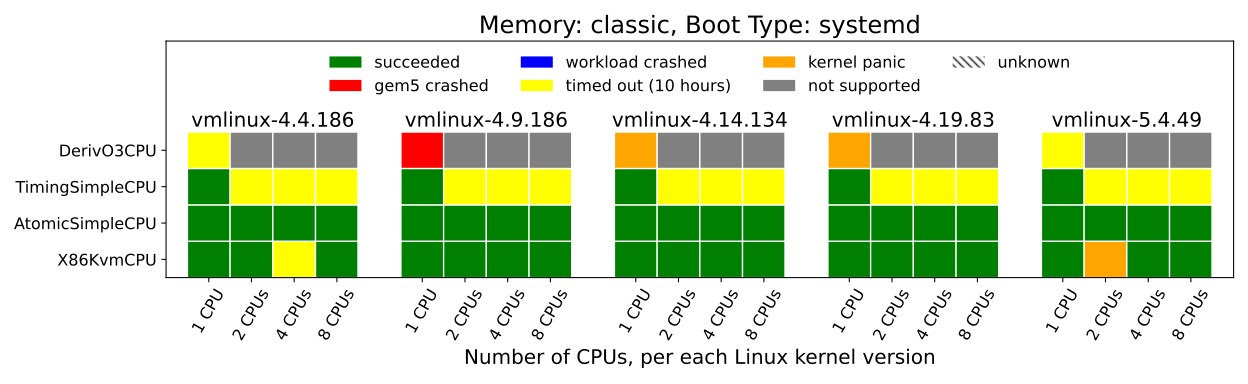
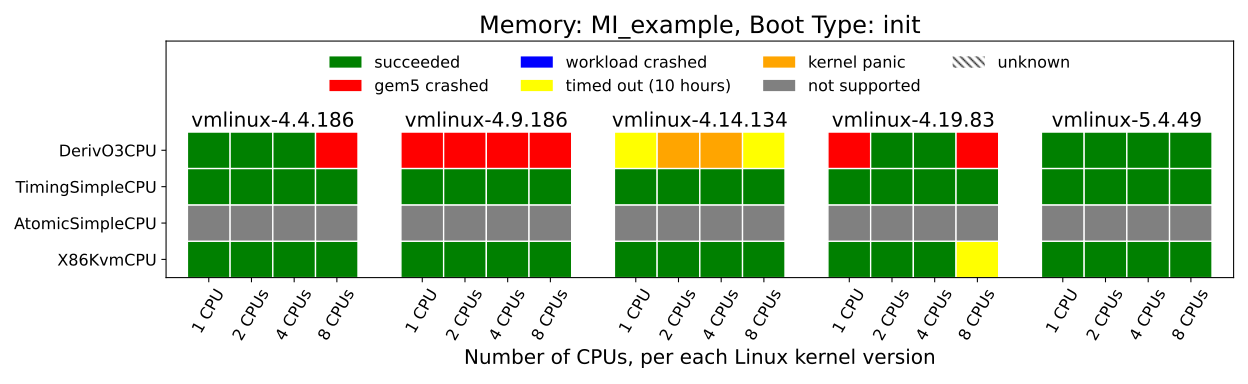
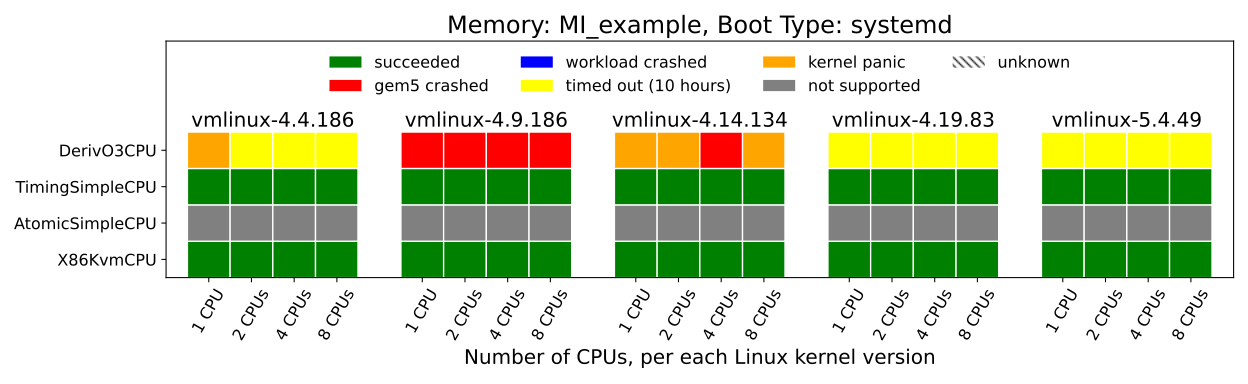
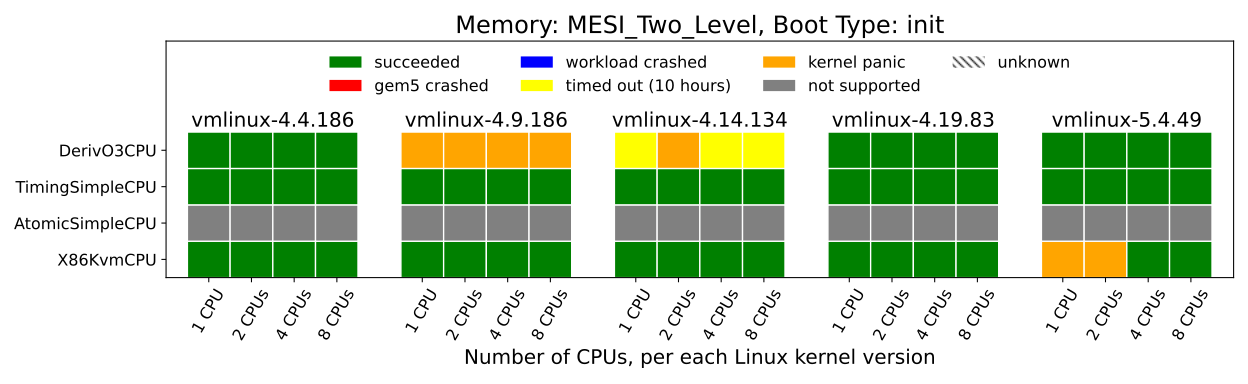
Following plots show the status of linux booting based on the results of the experiments of this tutorial:


You can look here for the latest status of these tests on gem5.