
在 gem5 中建模缓存一致性
大纲
- 一点历史和一致性提醒
- SLICC 协议的组件
- 调试协议
- 在 Ruby 中查找内容的位置
- 包含的协议
我们不会做的事情
从头编写新协议(不过我们会填补一些缺失的部分)
gem5 历史
M5 + GEMS = gem5
M5: “经典”缓存、CPU 模型、请求者/响应者端口接口
GEMS: Ruby + 网络
缓存一致性提醒
单写多读(SWMR)不变性

缓存一致性提醒
单写多读(SWMR)不变性

Ruby 架构

黑盒内部的 Ruby

Ruby 组件
- 控制器模型 (例如,缓存):管理一致性状态并发出请求
- 控制器拓扑 (缓存如何连接):决定消息如何路由
- 互连模型 (例如,片上路由器):决定路由性能
- 接口 (如何将消息传入/传出 Ruby)
注意:Ruby 的主要目标是 灵活性,而不是 可用性。
控制器模型
- 在 “SLICC” 中实现
- Specification Language for Including Cache Coherence(包含缓存一致性的规范语言)
- SLICC 是一种领域特定语言
- 描述一致性协议
- 生成 C++ 代码
- 查看
build/.../mem/ruby/protocol中的生成文件(但你真的不想读这些。)
要实现的缓存一致性示例
- MSI:Modified(已修改)、Shared(共享)、Invalid(无效)
- 来自 Nagarajan、Sorin、Hill 和 Wood 的 A Primer on Memory Consistency and Cache Coherence。
- 8.2 节摘录下载

SLICC 的原始目的
- 创建这些表格
实际输出!
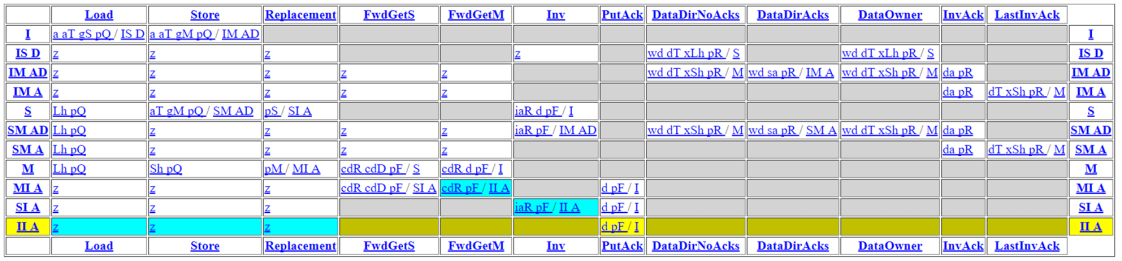
自动生成代码的工作原理
重要 永远不要修改这些文件!

缓存状态机概述
- 参数:这些是
SimObject参数(以及一些特殊的东西)- 缓存内存:存储数据的地方
- 消息缓冲区:从网络发送和接收消息
- 状态声明:稳定状态和瞬态
- 事件声明:将被”触发”的状态机事件
- 其他结构和函数:条目、TBE、get/setState 等
- 输入端口:基于传入消息触发事件
- 动作:在缓存结构上执行单个操作
- 转换:从状态移动到状态并执行动作
输入端口读取缓存内存,然后触发事件。 事件根据状态导致转换,这些转换执行动作。 动作可以更新缓存内存并通过消息缓冲区发送消息。
缓存内存
- 参见
src/mem/ruby/structures/CacheMemory - 存储缓存数据(在 SLICC 文件中定义的
Entry中) - 可以使用函数
cacheProbe()在发生缓存未命中时获取替换地址- 与
src/mem/cache/replacement_policies中的替换策略交互
- 与
重要:访问
Entry时始终调用setMRU(),否则替换策略将不起作用。
(除非你正在修改 Ruby 本身,否则你永远不需要修改 CacheMemory。)
消息缓冲区
MessageBuffer * requestToDir, network="To", virtual_network="0", vnet_type="request";
MessageBuffer * forwardFromDir, network="From", virtual_network="1", vnet_type="forward";
- 声明消息缓冲区相当令人困惑。
- to/from 将它们声明为 “in_port” 类型或 “out_port” 类型。
- 当某些消息的优先级高于其他消息时,需要虚拟网络。
vnet_type是消息类型。”Response” 表示消息携带数据,并在 Garnet 中用于计算缓冲区信用。- 消息缓冲区具有以下接口
peek():获取头部消息pop():移除头部消息(不要忘记这个,否则会出现死锁!)isReady():检查是否有消息可读recycle():获取头部消息并将其放在尾部(用于让阻塞消息移开)stallAndWait():将头部消息移动到单独的队列(稍后不要忘记调用wakeUpDependents()!)
实践:编写和调试协议
参见 materials/03-Developing-gem5-models/06-modeling-cache-coherence/README.md
你将:
- 为编译器声明协议
- 填写消息类型
- 完成消息缓冲区
- 测试协议
- 找到一个 bug
- 修复 bug
- 使用 ruby 随机测试器进行测试
步骤 0:复制模板
cp -r materials/03-Developing-gem5-models/06-modeling-cache-coherence/MyMSI* gem5/src/mem/ruby/protocol
声明协议
修改 src/mem/ruby/protocol/MyMSI.slicc
- 需要告诉 Scons 状态机文件
- 在名为
<protocol>.slicc的文件中 - 可以将相同状态机(
.sm)文件用于多个协议 - 通常,你希望在
src/mem/ruby/protocol目录中执行此操作。
protocol "MyMSI";
include "RubySlicc_interfaces.slicc";
include "MyMSI-msg.sm";
include "MyMSI-cache.sm";
include "MyMSI-dir.sm";
记住每个协议必须单独编译的注意事项。 希望这不是永久要求。
声明消息类型
修改 src/mem/ruby/protocol/MyMSI-msg.sm
enumeration(CoherenceRequestType, desc="请求消息类型") {
    GetS,       desc="缓存请求具有读权限的块";
    GetM,       desc="缓存请求具有写权限的块";
    PutS,       desc="在 S 状态驱逐块时发送到目录(干净写回)";
    PutM,       desc="在 M 状态驱逐块时发送到目录";
    ...
}
enumeration(CoherenceResponseType, desc="响应消息类型") {
    Data,       desc="包含最新的数据";
    InvAck,     desc="来自另一个缓存的消息,表示它们已使该块无效";
}
目录的消息缓冲区
修改 src/mem/ruby/protocol/MyMSI-dir.sm
    // 从目录*到*缓存的转发请求。
    MessageBuffer *forwardToCache, network="To", virtual_network="1",
          vnet_type="forward";
    // 从目录*到*缓存的响应。
    MessageBuffer *responseToCache, network="To", virtual_network="2",
          vnet_type="response";

    // 从缓存*到*目录的请求
    MessageBuffer *requestFromCache, network="From", virtual_network="0",
          vnet_type="request";

    // 从缓存*到*目录的响应
    MessageBuffer *responseFromCache, network="From", virtual_network="2",
          vnet_type="response";
编译你的新协议
首先,在 Kconfig 构建器中注册协议。修改 src/mem/ruby/protocol/Kconfig。
config PROTOCOL
    default "MyMSI" if RUBY_PROTOCOL_MYMSI
and
cont_choice "Ruby protocol"
    config RUBY_PROTOCOL_MYMSI
        bool "MyMSI"
运行 scons 进行编译
为带有你的协议的 gem5 二进制文件创建一个新的构建目录。让我们从 build_opts/ALL 的配置开始并修改它。你需要更改协议,并且应该启用 HTML 输出。
scons defconfig build/ALL_MyMSI build_opts/ALL
安装必要的语言环境并启动 menuconfig。
apt-get update && apt-get install locales
locale-gen en_US.UTF-8
export LANG="en_US.UTF-8"
scons menuconfig build/ALL_MyMSI
# Ruby -> Enable -> Ruby protocol -> MyMSI
scons -j$(nproc) build/ALL_MyMSI/gem5.opt PROTOCOL=MyMSI
创建运行脚本
修改 configs/learning_gem5/part3/msi_caches.py 以使用你的新协议。
此文件为 gem5 代码库中已有的 MSI 缓存设置 Ruby 协议。为了简单起见,我们将使用它。
build/ALL_MyMSI/gem5.opt configs/learning_gem5/part3/simple_ruby.py
在等待编译时,让我们看一下代码的一些细节。 (今天自己编写所有代码太多了…所以让我们只是阅读它)
让我们看一些代码:输入端口定义
来自 gem5/src/learning_gem5/part3/MSI-cache.sm
in_port(mandatory_in, RubyRequest, mandatoryQueue) {
    if (mandatory_in.isReady(clockEdge())) {
        peek(mandatory_in, RubyRequest, block_on="LineAddress") {
            Entry cache_entry := getCacheEntry(in_msg.LineAddress);
            TBE tbe := TBEs[in_msg.LineAddress];
            if (is_invalid(cache_entry) &&
                    cacheMemory.cacheAvail(in_msg.LineAddress) == false ) {
                Addr addr := cacheMemory.cacheProbe(in_msg.LineAddress);
                Entry victim_entry := getCacheEntry(addr);
                TBE victim_tbe := TBEs[addr];
                trigger(Event:Replacement, addr, victim_entry, victim_tbe);
            } else {
                if (in_msg.Type == RubyRequestType:LD ||
                        in_msg.Type == RubyRequestType:IFETCH) {
                    trigger(Event:Load, in_msg.LineAddress, cache_entry,
                            tbe);
                } else if (in_msg.Type == RubyRequestType:ST) {
                    trigger(Event:Store, in_msg.LineAddress, cache_entry,
                            tbe);
                } else {
                    error("Unexpected type from processor");
                }
            }
        }
    }
}
状态声明
参见 gem5/src/mem/ruby/protocol/MSI-cache.sm
state_declaration(State, desc="缓存状态") {
 I,      AccessPermission:Invalid, desc="不存在/无效";
 // 从 I 状态移出的状态
 IS_D,   AccessPermission:Invalid, desc="无效,移动到 S,等待数据";
 IM_AD,  AccessPermission:Invalid, desc="无效,移动到 M,等待确认和数据";
 IM_A,   AccessPermission:Busy,    desc="无效,移动到 M,等待确认";

 S,      AccessPermission:Read_Only, desc="共享。只读,其他缓存可能拥有该块";
 . . .
}
AccessPermission:...:用于功能访问
IS_D:无效,等待数据移动到共享状态
事件声明
参见 gem5/src/mem/ruby/protocol/MSI-cache.sm
enumeration(Event, desc="缓存事件") {
 // 来自处理器/序列器/强制队列
 Load,           desc="来自处理器的加载";
 Store,          desc="来自处理器的存储";

 // 内部事件(仅由处理器请求触发)
 Replacement,    desc="当块被选为牺牲者时触发";

 // 通过目录在转发网络上从其他缓存转发的请求
 FwdGetS,        desc="目录向我们发送请求以满足 GetS。";
                      "我们必须拥有 M 状态的块才能响应此请求。";
 FwdGetM,        desc="目录向我们发送请求以满足 GetM。";
 . . .
其他结构和函数
参见 gem5/src/mem/ruby/protocol/MSI-cache.sm
- Entry:声明每个条目的数据结构
- 块数据、块状态,有时还有其他(例如,令牌)
- TBE/TBETable:瞬态缓冲区条目
- 类似于 MSHR,但不完全相同(分配更频繁)
- 保存瞬态状态块的数据
- get/set State、AccessPermissions、功能读/写
- 实现 AbstractController 所必需
- 通常只是从示例中复制粘贴
端口和消息缓冲区
不是 gem5 端口!
- out_port:”重命名”消息缓冲区并声明消息类型
- in_port:SLICC 的大部分”魔法”在这里。
- 每个周期调用
- 查看头部消息
- 触发事件
注意:(一般经验法则)你应该只在
in_port块中有if语句。永远不要在动作中。
输入端口块
in_port(forward_in, RequestMsg, forwardToCache) {
 if (forward_in.isReady(clockEdge())) {
   peek(forward_in, RequestMsg) {
     Entry cache_entry := getCacheEntry(in_msg.addr);
     TBE tbe := TBEs[in_msg.addr];
     if (in_msg.Type == CoherenceRequestType:GetS) {
        trigger(Event:FwdGetS, in_msg.addr, cache_entry, tbe);
     } else
 . . .
这是看起来像函数调用的奇怪语法,但它不是。
自动填充一个名为 in_msg 的”局部变量”。
trigger() 查找转换。
它还自动确保所有资源都可用于完成转换。
动作
action(sendGetM, "gM", desc="向目录发送 GetM") {
 enqueue(request_out, RequestMsg, 1) {
    out_msg.addr := address;
    out_msg.Type := CoherenceRequestType:GetM;
    out_msg.Destination.add(mapAddressToMachine(address, MachineType:Directory));
    out_msg.MessageSize := MessageSizeType:Control;
    out_msg.Requestor := machineID;
 }
}
enqueue 类似于 peek,但它自动填充 out_msg
某些变量在动作中是隐式的。这些通过 in_port 中的 trigger() 传入。
这些是 address、cache_entry、tbe
转换
transition(I, Store, IM_AD) {
  allocateCacheBlock;
  allocateTBE;
  ...
}
transition({IM_AD, SM_AD}, {DataDirNoAcks, DataOwner}, M) {
  ...
  externalStoreHit;
  popResponseQueue;
}
(I, Store, IM_AD):从状态I在事件Store上转换到状态IM_AD({IM_AD, SM_AD}, {DataDirNoAcks, DataOwner}, M):从IM_AD或SM_AD在DataDirNoAcks或DataOwner上转换到状态M- 几乎总是在最后
pop - 不要忘记使用统计信息!
现在,练习
代码现在应该已经编译好了!
参见 materials/03-Developing-gem5-models/06-modeling-cache-coherence/README.md
你将:
- 为编译器声明协议
- 填写消息类型
- 完成消息缓冲区
- 测试协议
- 找到一个 bug
- 修复 bug
- 使用 ruby 随机测试器进行测试
调试协议
运行并行测试
build/ALL_MyMSI/gem5.opt configs/learning_gem5/part3/simple_ruby.py
结果是失败!
build/ALL_MyMSI/mem/ruby/protocol/L1Cache_Transitions.cc:266: panic: Invalid transition
system.caches.controllers0 time: 73 addr: 0x9100 event: DataDirNoAcks state: IS_D
使用协议跟踪运行
build/ALL_MyMSI/gem5.opt --debug-flags=ProtocolTrace configs/learning_gem5/part3/simple_ruby.py
开始修复错误并填写 MyMSI-cache.sm
修复错误:缺少转换
- 缓存中缺少 IS_D 转换
- 将数据写入缓存
- 释放 TBE
- 标记这是”外部加载命中”
- 弹出响应队列
transition(IS_D, {DataDirNoAcks, DataOwner}, S) {
    writeDataToCache;
    deallocateTBE;
    externalLoadHit;
    popResponseQueue;
}
修复错误:缺少动作
- 填写”将数据写入缓存”动作
- 从消息中获取数据(如何获取消息?)
- 设置缓存条目的数据(如何?
cache_entry来自哪里?) - 确保有
assert(is_valid(cache_entry))
action(writeDataToCache, "wd", desc="将数据写入缓存") {
    peek(response_in, ResponseMsg) {
        assert(is_valid(cache_entry));
        cache_entry.DataBlk := in_msg.DataBlk;
    }
}
重试(对协议进行任何更改后必须重新编译):
scons build/ALL_MyMSI/gem5.opt -j$(nproc) PROTOCOL=MYMSI
build/ALL_MyMSI/gem5.opt --debug-flags=ProtocolTrace configs/learning_gem5/part3/simple_ruby.py
修复错误:为什么断言失败?
- 为什么断言失败?
- 填写
allocateCacheBlock! - 确保调用
set_cache_entry。断言有可用条目且cache_entry无效是有帮助的。
- 填写
action(allocateCacheBlock, "a", desc="分配缓存块") {
    assert(is_invalid(cache_entry));
    assert(cacheMemory.cacheAvail(address));
    set_cache_entry(cacheMemory.allocate(address, new Entry));
}
重试:
scons build/ALL_MyMSI/gem5.opt -j$(nproc) PROTOCOL=MYMSI
build/ALL_MyMSI/gem5.opt --debug-flags=ProtocolTrace configs/learning_gem5/part3/simple_ruby.py
当调试时间过长时:RubyRandomTester
在某些时候,可能需要一段时间才能遇到新错误,所以…
运行 Ruby 随机测试器。这是一个特殊的”CPU”,它测试一致性边界情况。
- 以与
msi_caches.py相同的方式修改test_caches.py
build/ALL_MyMSI/gem5.opt --debug-flags=ProtocolTrace configs/learning_gem5/part3/ruby_test.py
注意你可能想要更改 test_caches.py 中的 checks_to_complete 和 num_cpus。
你可能还想减少内存延迟。
使用随机测试器
build/ALL_MyMSI/gem5.opt --debug-flags=ProtocolTrace configs/learning_gem5/part3/ruby_test.py
- 哇!现在应该更快地看到错误了!
- 现在,你需要在缓存中处理这个!
transition(S, Inv, I)- 如果你收到无效化…
- 发送确认,让 CPU 知道这一行已无效化,释放块,弹出队列
- 所以,现在,嗯,看起来它工作了???但还有一个
- 某些转换非常罕见:
transition(I, Store, IM_AD) - 尝试改变测试器的参数(不使用
ProtocolTrace!)以找到触发错误的组合(100000 次检查,8 个 CPU,50ns 内存…)
- 某些转换非常罕见:
- 现在,你可以修复错误了!
转换
transition(S, Inv, I) {
  sendInvAcktoReq;
  forwardEviction;
  deallocateCacheBlock;
  popForwardQueue;
}

transition(I, Store,IM_AD) {}
  allocateCacheBlock;
  allocateTBE;
  sendGetM;
  popMandatoryQueue;
}
再次运行 Scons 和 Python 脚本
修复错误:死锁
- 可能的死锁…嗯…如果缓存中长时间没有任何事情发生,就会发生这种情况。
- 死锁之前发生的最后一件事是什么?让我们检查应该发生什么
- 填写它!
transition({SM_AD, SM_A}, {Store, Replacement, FwdGetS, FwdGetM}) {
    stall;
}

action(loadHit, "Lh", desc="加载命中") {
  // 将此条目设置为最近使用的,用于替换策略
  // 将数据发送回序列器/CPU。注意:False 表示这不是"外部命中",而是在此本地缓存中命中。
  assert(is_valid(cache_entry));
  // 将此条目设置为最近使用的,用于替换策略
  cacheMemory.setMRU(cache_entry);
  // 将数据发送回序列器/CPU。注意:False 表示这不是"外部命中",而是在此本地缓存中命中。
  sequencer.readCallback(address, cache_entry.DataBlk, false);
}
重试(Scons 和 Python 脚本)
scons build/ALL_MyMSI/gem5.opt -j$(nproc) PROTOCOL=MYMSI
build/ALL_MyMSI/gem5.opt --debug-flags=ProtocolTrace configs/learning_gem5/part3/ruby_test.py
修复错误:存储时该做什么
- 修复下一个错误(存储时该做什么??)
- 分配一个块,分配一个 TBE,发送消息,弹出队列
- 还要确保所有需要的动作
- 发送时,需要构造新消息。参见
MyMSI-msg.sm中的RequestMsg
 action(sendGetM, "gM", desc="Send GetM to the directory") {
        // 在请求输出端口上用 enqueue 填写这个
    enqueue(request_out, RequestMsg, 1) {
      out_msg.addr := address;
      out_msg.Type := CoherenceRequestType:GetM;
      out_msg.Destination.add(mapAddressToMachine(address,
                                    MachineType:Directory));
      out_msg.MessageSize := MessageSizeType:Control;
      out_msg.Requestor := machineID;
    }
  }
运行 Scons 和 Python 脚本
最终错误:存在共享时该做什么?
- 下一个错误:存在共享时该做什么??
- 从内存获取数据(是的,这是一个未优化的协议..)
- 从共享者中移除请求者(以防万一)
- 向所有其他共享者发送无效化
- 设置所有者
- 并弹出队列
- 现在编辑
MyMSI-dir.smtransition(S, GetM, M_m) { sendMemRead; removeReqFromSharers; sendInvToSharers; setOwner; popRequestQueue; }重试(Scons 和 Python 脚本):(注意:这次没有协议跟踪,因为它基本正常工作了)
build/ALL_MyMSI/gem5.opt configs/learning_gem5/part3/ruby_test.py
现在它工作了…查看统计信息
重新运行简单的 pthread 测试,让我们查看一些统计信息!
build/ALL_MyMSI/gem5.opt configs/learning_gem5/part3/simple_ruby.py
- L1 缓存接收了多少转发消息?
- 缓存必须从 S -> M 升级多少次?
- L1 的平均未命中延迟是多少?
- 当另一个缓存有数据时的平均未命中延迟是多少?
答案
- L1 缓存接收了多少转发消息?
grep -i fwd m5out/stats.txt- (
...FwdGetM+...FwdGetS) = (16+13) = 29
- (
- 缓存必须从 S -> M 升级多少次?
grep L1Cache_Controller.SM_AD.DataDirNoAcks::total m5out/stats.txt565 - L1 的平均未命中延迟是多少?
grep MachineType.L1Cache.miss_mach_latency_hist_seqr::mean m5out/stats.txt19.448276 - 当另一个缓存有数据时的平均未命中延迟是多少?
grep RequestTypeMachineType.ST.L1Cache.miss_type_mach_latency_hist_seqr::mean m5out/stats.txt18grep RequestTypeMachineType.LD.L1Cache.miss_type_mach_latency_hist_seqr::mean - 乘以样本大小(…::sample),然后相加
Ruby 配置脚本
- 没有严格遵循 gem5 风格 :(
- 需要大量样板代码
- 标准库做得更好
这些脚本中需要什么?
- 实例化控制器
这是你向
.sm文件传递所有参数的地方 - 为每个 CPU(以及 DMA 等)创建一个
Sequencer稍后会有更多详细信息 - 创建并连接所有网络路由器
创建拓扑
- 你可以以任何方式连接路由器:
- 网格、环面、环形、交叉开关、蜻蜓等
- 通常隐藏在
create_topology中(参见 configs/topologies)- 问题:这些对控制器做了假设
- 不适合非默认协议
创建拓扑后(在模拟之前),Ruby 的网络模型将找到片上网络中从一个节点到另一个节点的所有有效路径。 因此,OCN 与控制器类型和协议完全分离。
点对点示例
self.routers = [Switch(router_id = i) for i in range(len(controllers))]
self.ext_links = [SimpleExtLink(link_id=i, ext_node=c, int_node=self.routers[i])
                  for i, c in enumerate(controllers)]
link_count = 0
self.int_links = []
for ri in self.routers:
    for rj in self.routers:
        if ri == rj: continue # 不要将路由器连接到自身!
        link_count += 1
        self.int_links.append(SimpleIntLink(link_id = link_count, src_node = ri, dst_node = rj))
self.routers:在点对点的情况下,每个控制器一个路由器- 必须有用于”内部”链路的路由器
self.ext_links:将控制器连接到路由器- 每个路由器可以有多个外部链路,但此点对点示例中不行
self.int_links:将路由器彼此连接
端口到 Ruby 到端口接口
还记得这张图吗?
- 在顶部,核心通过
Sequencer连接到 Ruby,在 SLICC 文件中称为mandatory_queue。- 当请求完成时,调用
sequencer.readCallback或sequencer.writeCallback。 - 确保包含它是命中还是未命中以用于统计。你甚至可以包含未命中在哪里被服务以获取更详细的统计信息。
- 当请求完成时,调用
- 在底部,任何
Controller都可以有一个请求者端口,你可以通过使用特殊消息缓冲区requestToMemory和responseFromMemory发送消息。
在哪里…?
配置
- configs/network:网络模型的配置
- configs/topologies:默认缓存拓扑
- configs/ruby:协议配置和 Ruby 配置
- 注意:希望更多内容移到标准库!
- Ruby 配置:configs/ruby/Ruby.py
- Ruby 配置和辅助函数的入口点
- “自动”选择正确的协议配置
SLICC:不要害怕修改编译器
- src/mem/slicc:编译器的代码
- src/mem/ruby/slicc_interface
- 仅在生成的代码中使用的结构
- AbstractController
在哪里…?
- src/mem/ruby/structures
- Ruby 中使用的结构(例如,缓存内存、替换策略)
- src/mem/ruby/system
- Ruby 包装代码和入口点
- RubyPort/Sequencer
- RubySystem:集中信息、检查点等
- src/mem/ruby/common:通用数据结构等
- src/mem/ruby/filters:布隆过滤器等
- src/mem/ruby/network:网络模型
- src/mem/ruby/profiler:一致性协议的性能分析
当前协议
- GPU VIPER(”真实”GPU-CPU 协议)
- GPU VIPER Region(HSC 论文)
- Garnet standalone(无一致性,仅流量注入)
- MESI 三级(类似于二级,但带有 L0 缓存)
- MESI 二级(私有 L1 共享 L2)
- MI 示例(示例:不要用于性能)
- MOESI AMD(核心对,3 级,可选区域一致性)
- MOESI CMP directory
- MOESI CMP token
- MOESI hammer(类似于用于 opteron/hyper transport 的 AMD hammer 协议)