
在 gem5 中建模 CPU 核心
大纲
- 了解 gem5 中的 CPU 模型
- AtomicSimpleCPU、TimingSimpleCPU、O3CPU、MinorCPU、KvmCPU
- 使用 CPU 模型
- 设置一个具有两个缓存大小和三个 CPU 模型的简单系统
- 查看 gem5 生成的统计信息
- 了解 CPU 模型之间的差异
- 创建自定义处理器
- 更改基于 O3CPU 的处理器的参数
gem5 CPU 模型
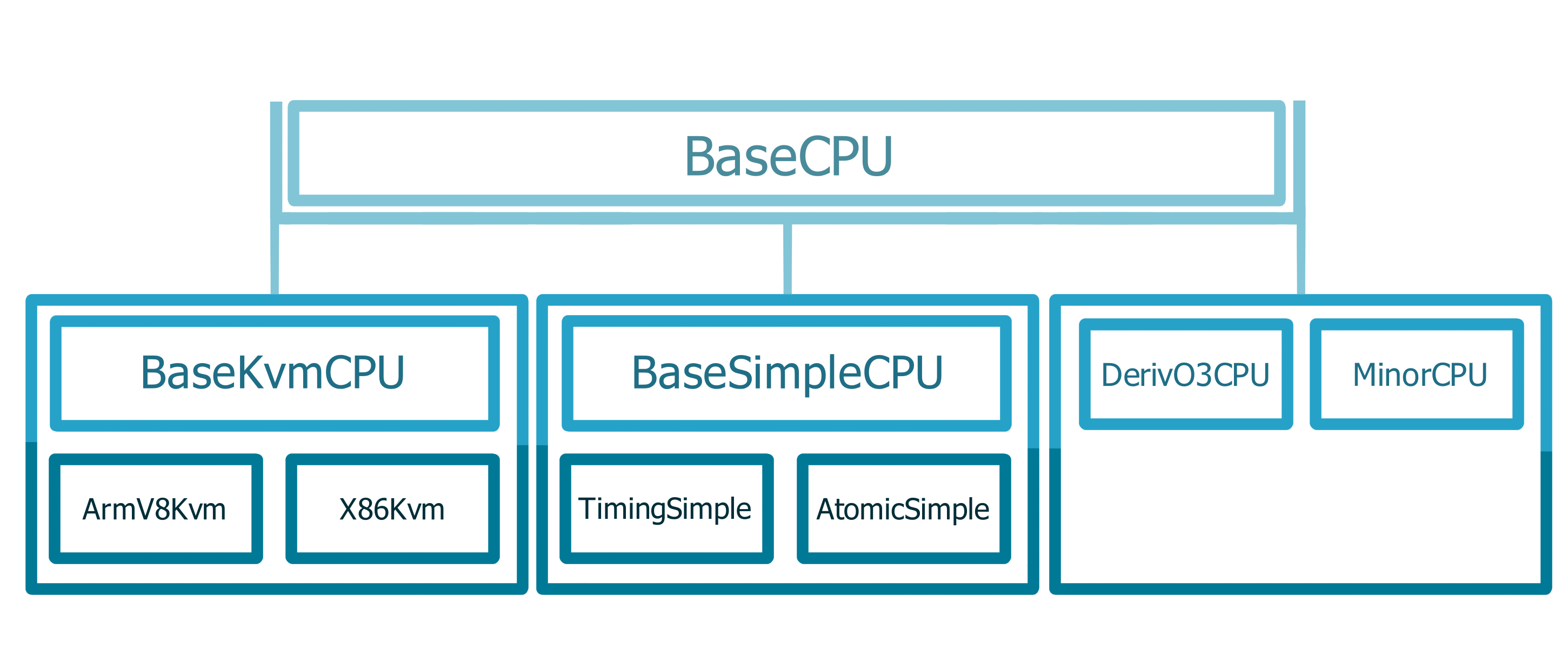
简单 CPU
SimpleCPU
原子(Atomic)
嵌套调用序列 用途:预热、快进
功能(Functional)
内存的后门访问 (加载二进制文件) 不影响一致性状态
时序(Timing)
分离事务 建模排队延迟和 资源竞争
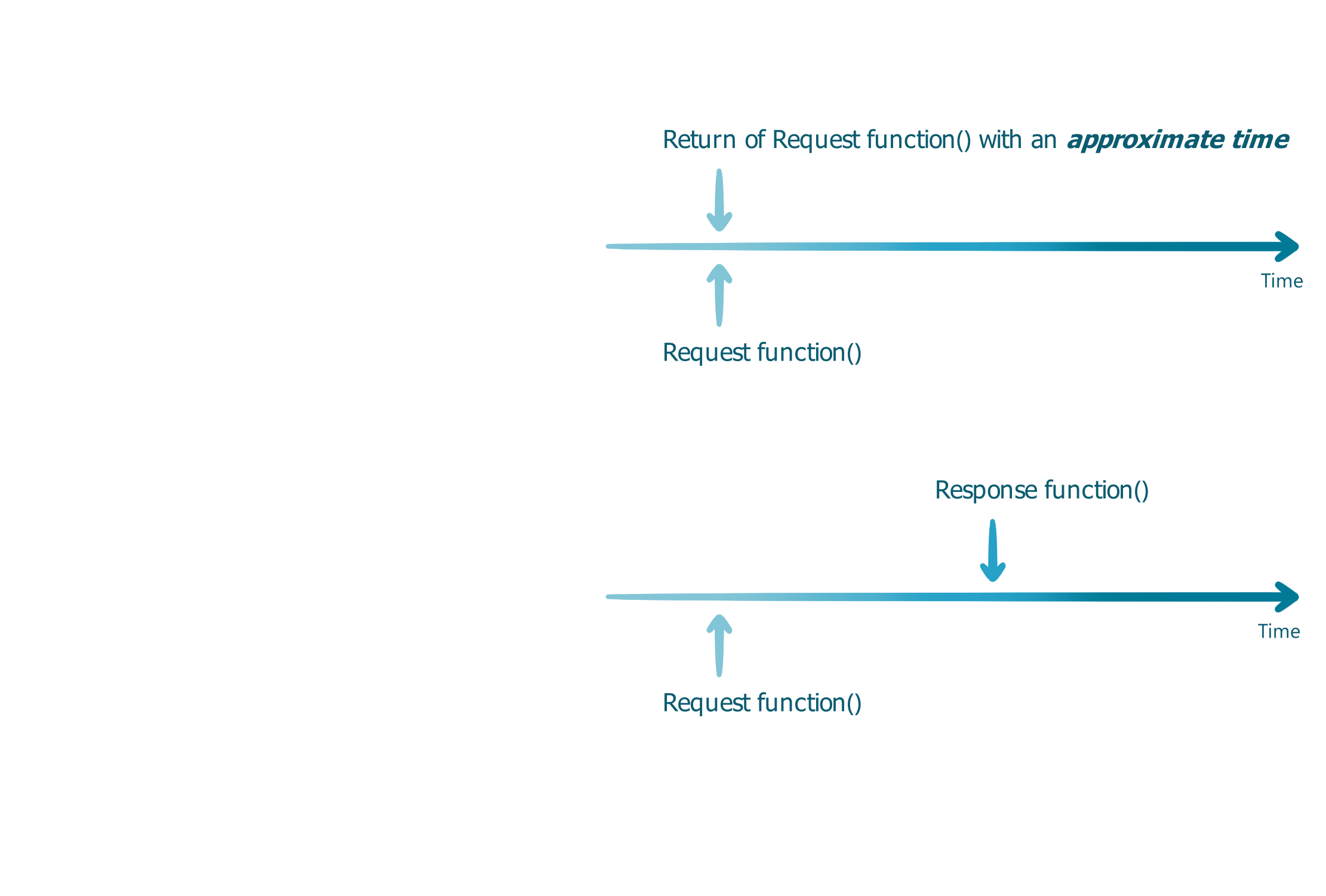
其他简单 CPU
AtomicSimpleCPU
- 使用 原子(Atomic) 内存访问
- 无资源竞争或排队延迟
- 主要用于快进和缓存预热
TimingSimpleCPU
- 使用 时序(Timing) 内存访问
- 在一个周期内执行非内存操作
- 详细建模内存访问的时序
O3CPU(乱序 CPU 模型)
- 时序(Timing) 内存访问,执行中执行 语义
- 阶段之间的时间缓冲区
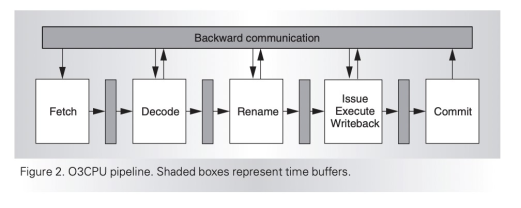
O3CPU 模型具有许多参数
decodeToFetchDelay = Param.Cycles(1, "Decode to fetch delay")
renameToFetchDelay = Param.Cycles(1, "Rename to fetch delay")
...
fetchWidth = Param.Unsigned(8, "Fetch width")
fetchBufferSize = Param.Unsigned(64, "Fetch buffer size in bytes")
fetchQueueSize = Param.Unsigned(
    32, "Fetch queue size in micro-ops per-thread"
)
...
请记住,不要直接在文件中更新参数。相反,创建一个新的 stdlib 组件,并使用新的参数值扩展模型。 我们很快就会这样做。
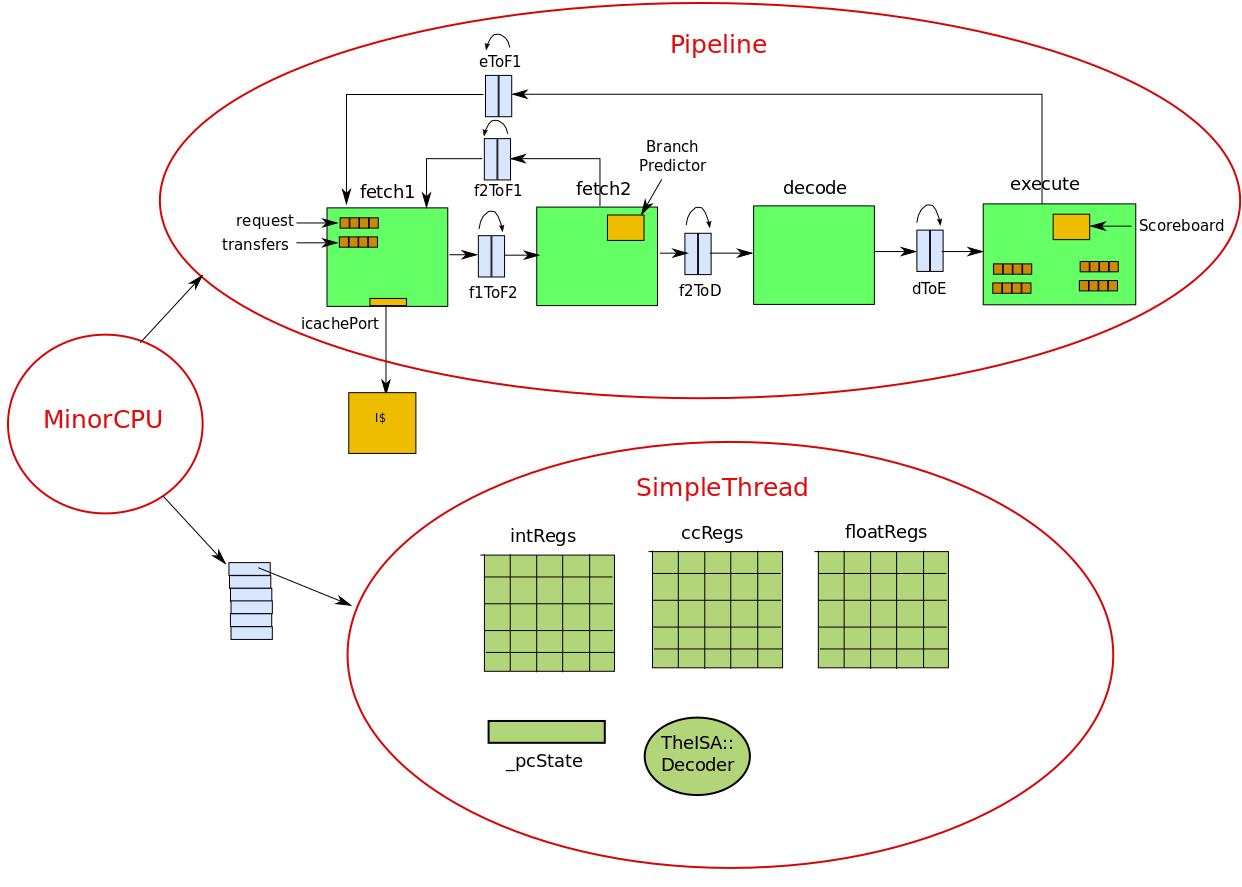
MinorCPU
KvmCPU
- KVM – 基于内核的虚拟机
- 用于在 x86 和 ARM 主机平台上进行原生执行
- 客户机和主机需要具有相同的 ISA
- 对功能测试和快进非常有用
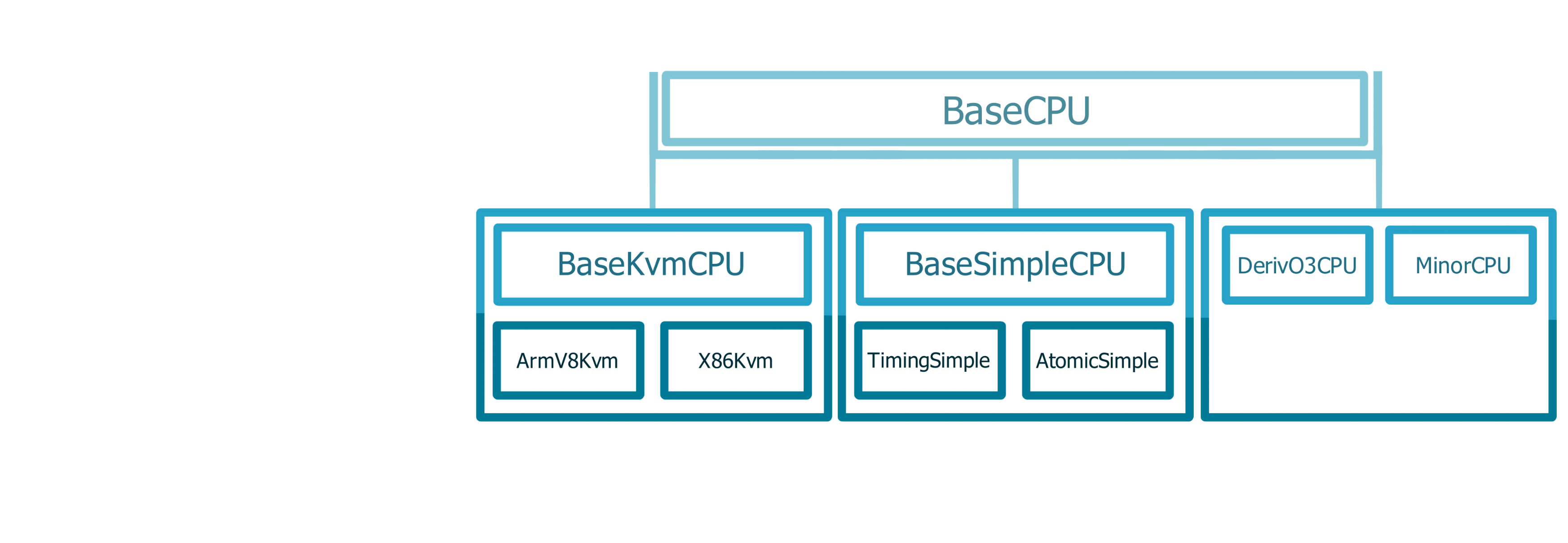
gem5 CPU 模型总结
BaseKvmCPU
- 非常快
- 无时序
- 无缓存、BP
BaseSimpleCPU
- 快
- 部分时序
- 缓存、有限的 BP
DerivO3CPU 和 MinorCPU
- 慢
- 时序
- 缓存、BP
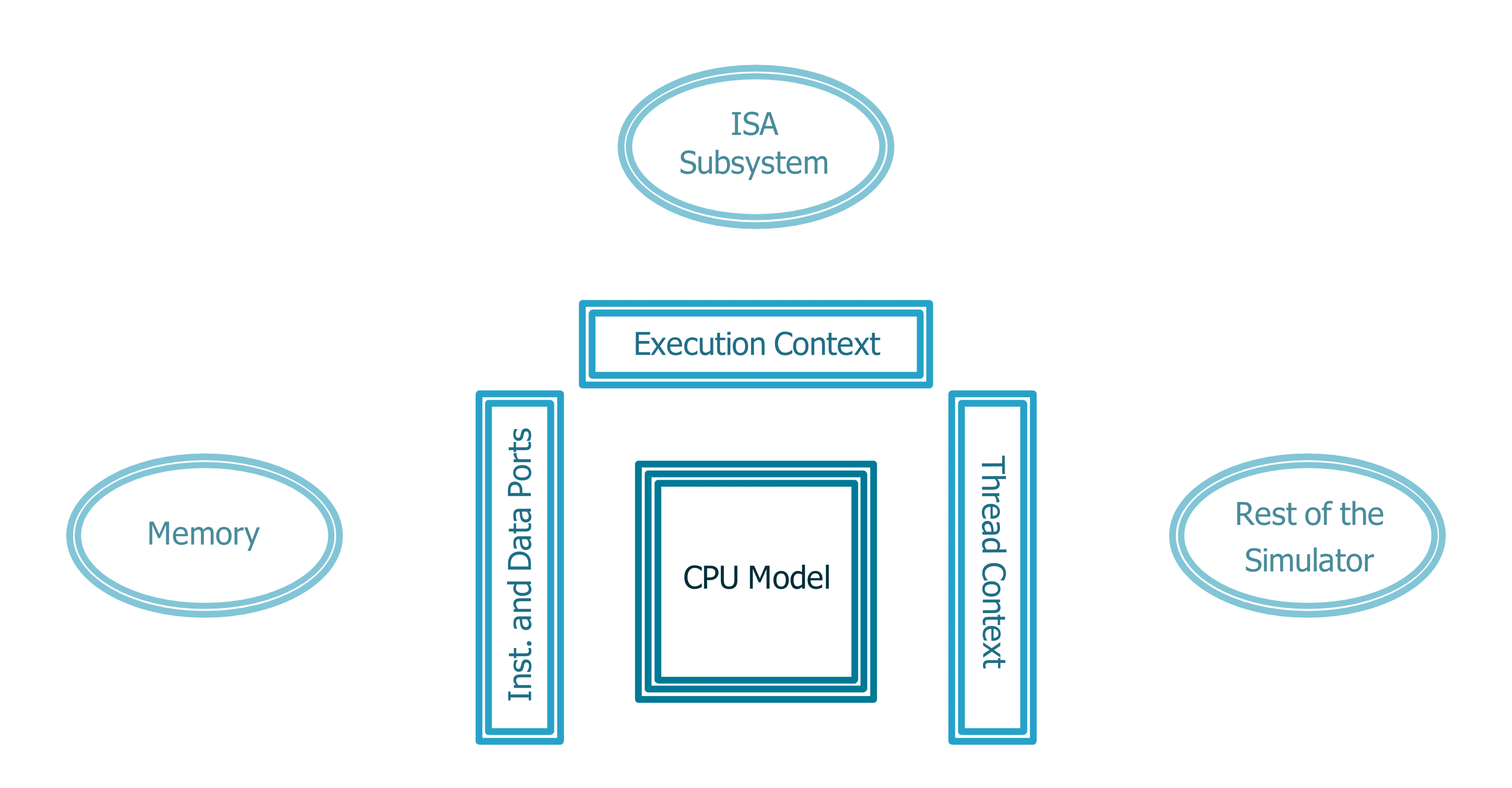
CPU 模型与 gem5 其他部分的交互
大纲
- 了解 gem5 中的 CPU 模型
- AtomicSimpleCPU、TimingSimpleCPU、O3CPU、MinorCPU、KvmCPU
- 使用 CPU 模型
- 设置一个具有两个缓存大小和三个 CPU 模型的简单系统
- 查看 gem5 生成的统计信息
- 了解 CPU 模型之间的差异
- 创建自定义处理器
- 更改基于 O3CPU 的处理器的参数
让我们使用这些 CPU 模型!
使用的材料
首先打开以下文件
materials/02-Using-gem5/04-cores/cores.py
步骤
- 使用原子 CPU 配置一个简单系统
- 使用时序 CPU 配置相同的系统
- 减小缓存大小
- 将 CPU 类型改回原子
我们将在不同的 CPU 类型和缓存大小上运行一个名为 matrix-multiply 的工作负载。
让我们使用原子 CPU 配置一个简单系统
materials/02-Using-gem5/04-cores/cores.py
from gem5.components.boards.simple_board import SimpleBoard
from gem5.components.cachehierarchies.classic.private_l1_cache_hierarchy import PrivateL1CacheHierarchy
from gem5.components.memory.single_channel import SingleChannelDDR3_1600
from gem5.components.processors.cpu_types import CPUTypes
from gem5.components.processors.simple_processor import SimpleProcessor
from gem5.isas import ISA
from gem5.resources.resource import obtain_resource
from gem5.simulate.simulator import Simulator


# 一个用于测试不同 CPU 模型的简单脚本
# 我们将使用 AtomicSimpleCPU 和 TimingSimpleCPU 运行一个简单应用程序(matrix-multiply)
# 使用两种不同的缓存大小
...
让我们从原子 CPU 开始
cores.py 中的 cpu_type 应该已经设置为原子。
# 默认情况下,使用原子 CPU
cpu_type = CPUTypes.ATOMIC

# 对于步骤 2 和 3,取消注释
# cpu_type = CPUTypes.TIMING
让我们运行它!
cd /workspaces/2024/materials/02-Using-gem5/04-cores
gem5 --outdir=atomic-normal-cache cores.py
确保输出目录设置为 atomic-normal-cache。
接下来,尝试时序 CPU
将 cores.py 中的 cpu_type 更改为时序。
# 默认情况下,使用原子 CPU
# cpu_type = CPUTypes.ATOMIC

# 对于步骤 2 和 3,取消注释
cpu_type = CPUTypes.TIMING
让我们运行它!
gem5 --outdir=timing-normal-cache cores.py
确保输出目录设置为 timing-normal-cache。
现在,尝试更改缓存大小
转到这行代码。
cache_hierarchy = PrivateL1CacheHierarchy(l1d_size="32KiB", l1i_size="32KiB")
将 l1d_size 和 l1i_size 更改为 1KiB。
cache_hierarchy = PrivateL1CacheHierarchy(l1d_size="1KiB", l1i_size="1KiB")
让我们运行它!
gem5 --outdir=timing-small-cache ./materials/02-Using-gem5/04-cores/cores.py
确保输出目录设置为 timing-small-cache。
现在让我们尝试使用原子 CPU 的小缓存
将 cores.py 中的 cpu_type 设置为原子。
# 默认情况下,使用原子 CPU
cpu_type = CPUTypes.ATOMIC

# 对于步骤 2 和 3,取消注释
# cpu_type = CPUTypes.TIMING
让我们运行它!
gem5 --outdir=atomic-small-cache cores.py
确保输出目录设置为 atomic-small-cache。
大纲
- 了解 gem5 中的 CPU 模型
- AtomicSimpleCPU、TimingSimpleCPU、O3CPU、MinorCPU、KvmCPU
- 使用 CPU 模型
- 设置一个具有两个缓存大小和三个 CPU 模型的简单系统
- 查看 gem5 生成的统计信息
- 了解 CPU 模型之间的差异
- 创建自定义处理器
- 更改基于 O3CPU 的处理器的参数
统计信息
查看操作数量
运行以下命令。
grep -ri "simOps" *cache
以下是预期结果。(注意:为便于阅读,已删除部分文本。)
atomic-normal-cache/stats.txt:simOps                                       33954560
atomic-small-cache/stats.txt:simOps                                        33954560
timing-normal-cache/stats.txt:simOps                                       33954560
timing-small-cache/stats.txt:simOps                                        33954560
“Ops” 可能与 “Instructions” 不同,因为 gem5 将指令分解为”微操作”。 x86 高度微码化,所有 ISA 在 gem5 中都有一些微码指令。
查看执行周期数
运行以下命令。
grep -ri "cores0.*numCycles" *cache
以下是预期结果。(注意:为便于阅读,已删除部分文本。)
atomic-normal-cache/stats.txt:board.processor.cores0.core.numCycles        38157549
atomic-small-cache/stats.txt:board.processor.cores0.core.numCycles         38157549
timing-normal-cache/stats.txt:board.processor.cores0.core.numCycles        62838389
timing-small-cache/stats.txt:board.processor.cores0.core.numCycles         96494522
请注意,对于原子 CPU,大缓存_和_小缓存的周期数是相同的。
这是因为原子 CPU 忽略了内存访问延迟。
关于 gem5 统计信息的额外说明
当您为统计文件指定输出目录时(当您使用标志 --outdir=<outdir-name>),请转到 <outdir-name>/stats.txt 查看完整的统计文件。
例如,要查看具有小缓存的原子 CPU 的统计文件,请转到 atomic-small-cache/stats.txt。
通常,如果您不指定输出目录,它将是 m5out/stats.txt。
其他要查看的统计信息
- 模拟时间(gem5 模拟的时间)
simSeconds
- 主机时间(gem5 运行模拟所花费的时间)
hostSeconds
大纲
- 了解 gem5 中的 CPU 模型
- AtomicSimpleCPU、TimingSimpleCPU、O3CPU、MinorCPU、KvmCPU
- 使用 CPU 模型
- 设置一个具有两个缓存大小和三个 CPU 模型的简单系统
- 查看 gem5 生成的统计信息
- 了解 CPU 模型之间的差异
- 创建自定义处理器
- 更改基于 O3CPU 的处理器的参数
让我们配置一个自定义处理器!
使用的材料
materials/02-Using-gem5/04-cores/cores-complex.py
materials/02-Using-gem5/04-cores/components/processors.py
步骤
- 更新类 Big(O3CPU) 和 Little(O3CPU)
- 使用 Big 处理器运行
- 使用 Little 处理器运行
- 比较统计信息
我们将在两个自定义处理器上运行相同的工作负载(matrix-multiply)。
配置两个处理器
我们将创建一个快速处理器(Big)和一个慢速处理器(Little)。
为此,我们将在每个处理器中更改 4 个参数。
- width
- 取指、解码、重命名、发射、写回和提交阶段的宽度
- rob_size
- 重排序缓冲区中的条目数
- num_int_regs
- 物理整数寄存器的数量
- num_fp_regs
- 物理向量/浮点寄存器的数量
配置 Big
打开以下文件: materials/02-Using-gem5/04-cores/components/processors.py
在右侧,您将看到 class Big 当前的样子。
将参数值更改为以下值:
width=10rob_size=40num_int_regs=50num_fp_regs=50
###
class Big(O3CPU):
    def __init__(self):
        super().__init__(
            width=0,
            rob_size=0,
            num_int_regs=0,
            num_fp_regs=0,
        )
配置 Little
现在,在右侧,您将看到 class Little 当前的样子。
将参数值更改为以下值:
width=2rob_size=30num_int_regs=40num_fp_regs=40
###
class Little(O3CPU):
    def __init__(self):
        super().__init__(
            width=0,
            rob_size=0,
            num_int_regs=0,
            num_fp_regs=0,
        )
使用 Big 处理器运行
我们将运行以下文件。 materials/02-Using-gem5/04-cores/cores-complex.py
首先,我们将使用 Big 处理器运行 matrix-multiply。
使用以下命令运行:
gem5 --outdir=big-proc cores-complex.py -p big
确保输出目录设置为 big-proc。
使用 Little 处理器运行
接下来,我们将使用 Little 处理器运行 matrix-multiply。
使用以下命令运行:
gem5 --outdir=little-proc cores-complex.py -p little
确保输出目录设置为 little-proc。
比较 Big 和 Little 处理器
运行以下命令。
grep -ri "simSeconds" *proc && grep -ri "numCycles" *proc
以下是预期结果。(注意:为便于阅读,已删除部分文本。)
big-proc/stats.txt:simSeconds                                           0.028124
little-proc/stats.txt:simSeconds                                        0.036715
big-proc/stats.txt:board.processor.cores.core.numCycles                 56247195
little-proc/stats.txt:board.processor.cores.core.numCycles              73430220
我们的 Little 处理器比 Big 处理器花费更多的时间和更多的周期。